Internet guide

How to find IP address of any domain name?

Written and reviewed by the WhatIsMyIP.live Editorial Team · Updated 9 February 2023

There are multiple times when you need to find out IP of your domain name. Specially, when you are a blogger and hosting our blog at blogspot and you want to find IP address to shift your blog over different hosting company such as Godaddy.

There are multiple ways where you can find IP address of any domain name:

1. Finding domain IP through command prompt

The first convenient method to find IP of your domain name is from command promt using a single DNS lookup command:

  • Open command prompt by going to Start -> Command Prompt or Go to Start - > RUN -> type "cmd" and press enter.
  • A black screen will come up
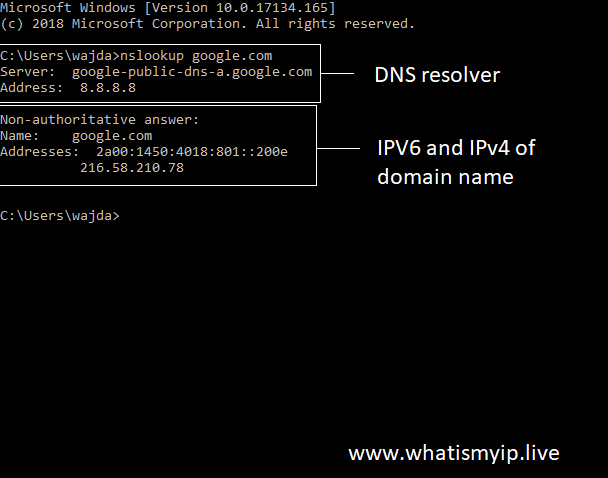
  • Type "nslookup google.com" - this command will show DNS information of google.com, replace google.com with your own domain name
  • First two lines show DNS resolver information. Second line will be IP address you will be looking for
Find domain to IP through command prompt


Above image shows both DNS resolver information and public IPv4 and IPv6 of the respected domain name


2. Finding domain name through Domain to IP tool

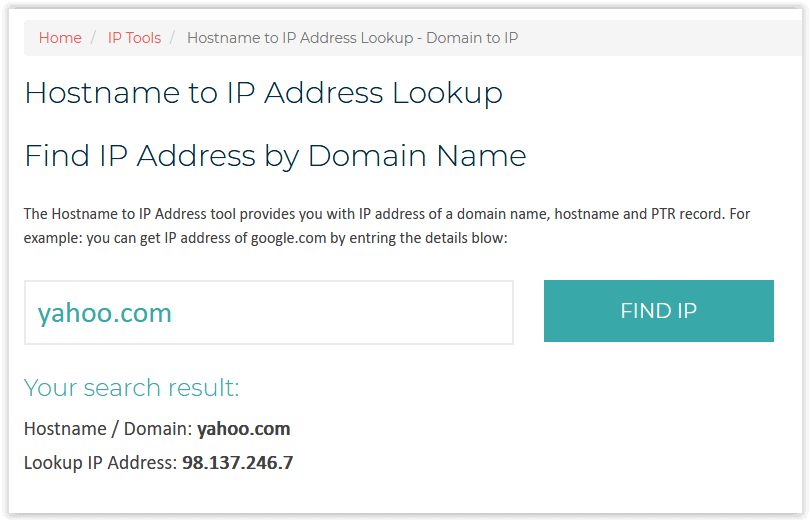
If you do not want to go with lengthy process above we have an easy method too where you can check IP address of your domain name almost instantly through Domain to IP address or Hostname to IP tool.

Hostname to IP tool allows you to display IP address almost instantly as soon you press "LOOKUP" button after entring your domain name in the search form. It works both for main domain names and subdomain names.
Domain to IP through whatismyip.live

If you are looking for full DNS information of a domain name such as IP address, MX record, Text record, NS records you can use DNS lookup tool for it.


Related Articles

Continue learning

5 related guides

Wi-Fi-Only Website Failures: A Two-Network Test Plan Before You Reset Anything When one website opens on mobile data but fails on Wi-Fi, you have a useful comparison—not a verdict. This guide shows how to keep the device and hostname constant, compare the two network exits, separate DNS from IPv4 and IPv6 behavior, avoid misleading trace results, and create a small privacy-aware report that support teams can act on. Read guide → Your Phone Can Be “In” Two Places Online: Reconcile IP and Device Location A website’s IP location and a phone or app’s device location can point to different places because they use different evidence. Use this two-location comparison method to test Wi-Fi, mobile data, VPN and managed-work connections, understand the result, and decide whether action is needed. Read guide → Why Does My Public IP Address Keep Changing? Understand dynamic IP leases, router reconnects, mobile networks, CGNAT, IPv6 privacy addresses and when a static IP is useful. Read guide → QUIC and HTTP/3 Explained: Why the Web Is Moving Beyond TCP Learn how QUIC carries HTTP/3 over UDP, improves connection setup and handles packet loss, roaming and encryption. Read guide → Post-Quantum Cryptography and HTTPS: What Changes for Users? A plain-English guide to quantum risk, harvest-now-decrypt-later attacks, hybrid encryption, migration and what website owners should do. Read guide →